
Artikel ini akan menjelaskan cara menkonfigurasi VPN Site-to-Site pada ASA dan Mikrotik.
Prerequisites
Dengan membaca artikel ini, anda diasumsikan telah mengetahui konsep-konsep seperti :
- Konsep dasar Routing & Switching
- Konsep Firewall
- IPSec VPN Site To Site
- Access-LIst (ACL)
- Konfigurasi Menggunakan Winbox pada Mikrotik
Device Info
| Cisco ASA | Mikrotik | |
| Jenis Perangkat | Firewall | Router OS |
| Version | 9.8(1) | 6.49.1 (stable) |
Topology
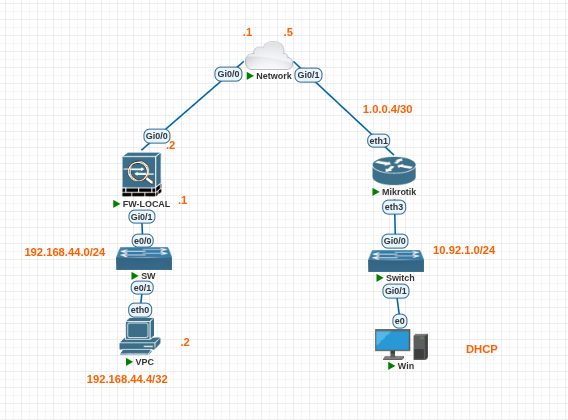
Pada topoliogi ini kita sebagai PC-1 (192.168.45.1) ingin mengakses PC-2 (10.92.1.0/24) pada yang terletak pada remote site. Untuk menjaga keamanan data, maka setiap paket yang terkirim dari site tersebut akan dilakukan enkripsi. Proses enkripsi tersebut akan dilakukan dengan bantuan VPN Site-to-site pada kedua sisi.
| IPSec Parameter | ASA (Local Site) | ASA (Remote) |
| IKE type | IKEv1 | IKEv1 |
| Pre-Shared-Key | Cisco123 | Cisco123 |
| P1 Encryption | AES-256 | AES-256 |
| P1 Authentication (Integrity) | SHA1 | SHA1 |
| P1 Diffie-Helman Group | Group 2 | Group 2 (Modp1024)1 |
| P1 PFS Group | None | None |
| P1 Lifetime | 4 Hours | 4 Hours |
| P2 Encryption Transform | ESP-AES-256 | AES-256 |
| P2 Authentication | ESP-SHA-HMAC | SHA1 |
| P2 Lifetime | 4 Hours | 4 Hours |
Cisco ASA Configuration
Pre-Config
conf t
hostname LOCAL-ASA
! Konfigurasi Interface
interface g0/0
nameif outside
no shut
ip address 1.0.0.2 255.255.255.252
interface g0/1
nameif inside
no shut
ip address 192.168.44.1 255.255.255.0
! Konfigurasi Routing Outside
route outside 0 0 1.0.0.1
! Konfigurasi ACL untuk Traffic Outside
access-list GeneralTraffic extended permit ip any4 any4
access-group GeneralTraffic in interface outsideIPsec Site-to-Site Config
! Object-Group untuk Segmen "interesting traffic"
object-group network local-network
network-object 192.168.44.0 255.255.255.0
object-group network remote-network
network-object 10.92.1.0 255.255.255.0
access-list asa-s2s-asa extended permit ip object-group local-network object-group remote-network
! PHASE 1 :::::
! Membuat Policy untuk IKEv1 Phase 1
! encryption, hash untuk authentication param, DH-Group 2, lifetime 4 Jam
crypto ikev1 policy 10
encryption aes-256
hash sha
authentication pre-share
group 2
lifetime 14400
! Enable IKEv1 pada interface outside
crypto ikev1 enable outside
! PHASE :: 2
! Tunnel Group for IKEv1
tunnel-group 1.0.0.6 type ipsec-l2l
tunnel-group 1.0.0.6 ipsec-attributes
pre-shared-key Cisco123
! IPSec Transform Set (Phase 2)
crypto ipsec transform-set ESP-AES256-SHA esp-aes-256 esp-sha-hmac
! Crypto Map Untuk Phase 2
crypto map outside_map 10 match address asa-s2s-asa
crypto map outside_map 10 set peer 1.0.0.6
crypto map outside_map 10 set transform-set ESP-AES256-SHA
crypto map outside_map 10 set security-association lifetime seconds 14400
crypto map outside_map interface outsideRemote Site Mikrotik Configuration
Konfigurasi Routing dan Interface
Buka mikrotik terminal dan masukan commandberikut.
/ip pool
add name=dhcp_pool0 ranges=10.92.1.10-10.92.1.254
/ip dhcp-server
add address-pool=dhcp_pool0 disabled=no interface=ether3 name=dhcp1
/ip dhcp-server network
add address=10.92.1.0/24 dns-server=8.8.8.8 gateway=10.92.1.1
/ip address
add address=10.92.1.1/24 interface=ether3 network=10.92.1.0
add address=1.0.0.6/30 interface=ether1 network=1.0.0.4
/ip route
add distance=1 gateway=1.0.0.5
Konfigurasi Phase 1 :: IKEv1 Phase 1 Parameter
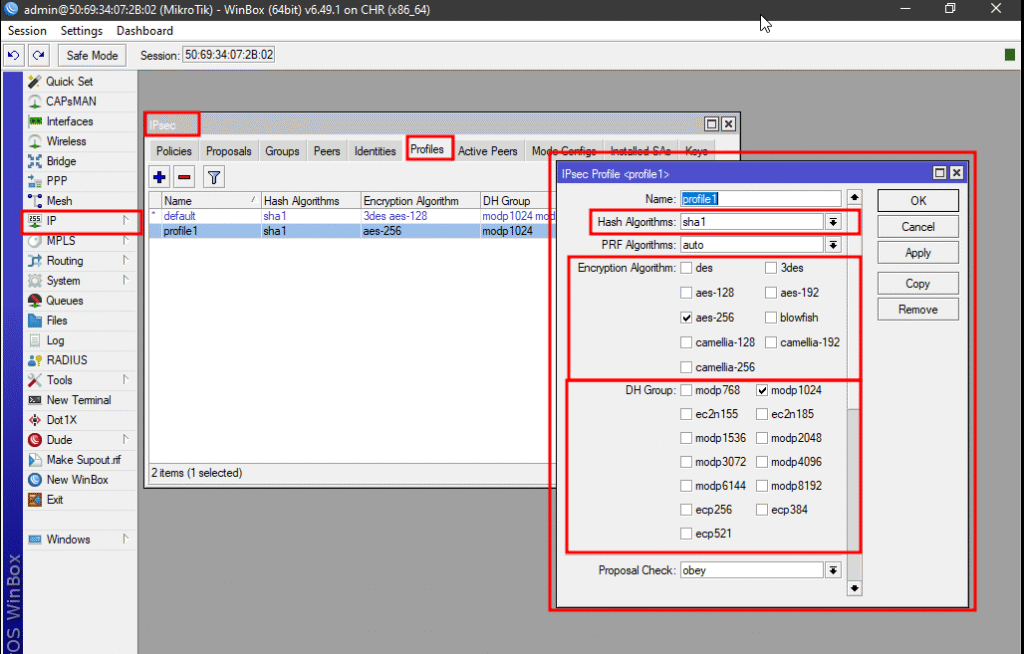
Pada winbox klik menu IP >> IPsec >> Profile. Kemudian tambahkan profile baru. Pada profile isikan parameter-parameter berikut.
Konfigurasi Profile tersebut bertujuan untuk melakukan SA peer pada phase 1 site-to-site
| Hash Algorithm | sha1 | P1 Authentication (Integrity) |
| Encryption Algorithm | aes-256 | P1 Encryption |
| DH Group Algorithm | DH 2 (modp1024) | DH Group 1 |
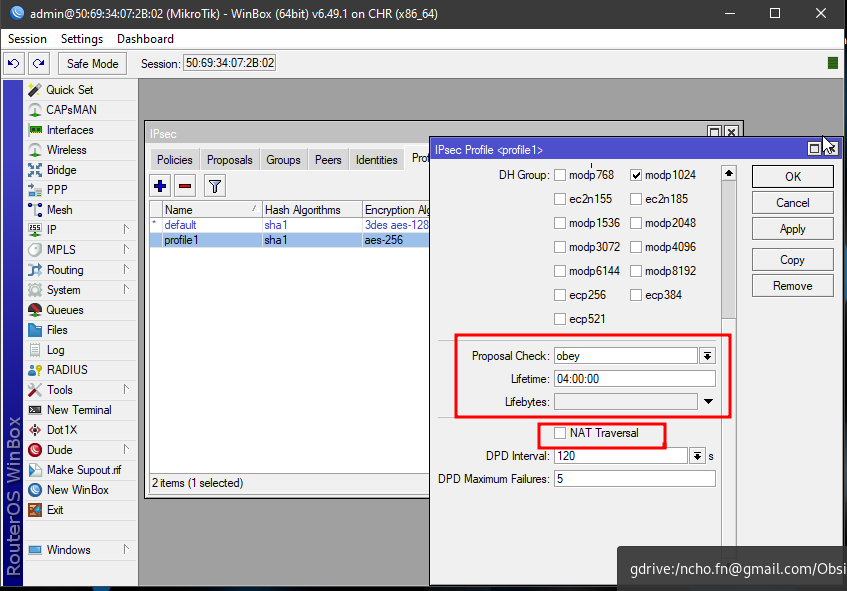
| Lifetime | 04:00:00 | Phase1 Lifetime |
| Nat Traversal | disabled | Protokol yang memungkinkan IPSec berkomunikasi dibelakang NAT. Hal ini di-disabled karena pada simulasi, IPSec berkomunikasi dengan IP Public3 |
Konfigurasi Phase 1 :: Menambahkan Peer
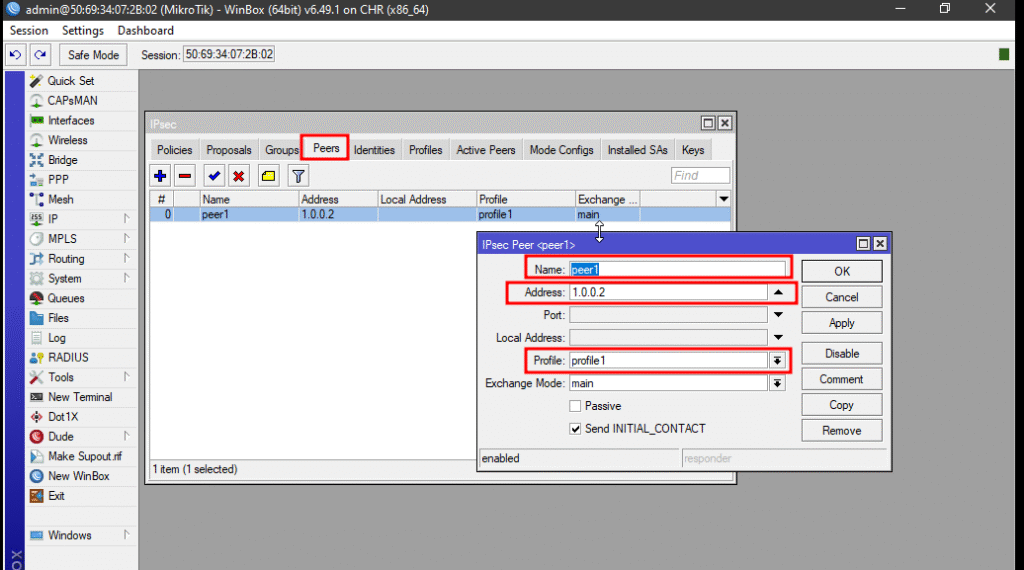
Pada winbox klik menu IP >> IPsec >> Peer . Kemudian tambahkan peer baru. Tambahkan remote address lalu profile .
| Address | 1.0.0.2 | IP Address dari outside interface ASA |
| Profile | profile1 | IPSec profile yang telah dibuat sebelumnya |
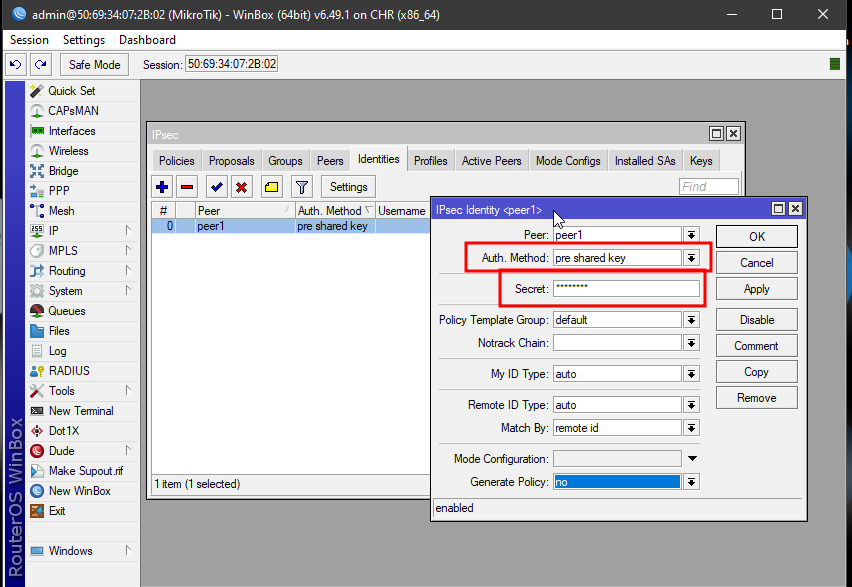
Konfigurasi : Pre-Shared Key
Agar remote dan local dapat berkomunikasi dengan baik maka diperlukan metode autentikasi. Pada artikel ini autentikasi dilakukan dengan pre-shared-key. Pad mikrotik buka IPSec >> Identites lalu masukan method pre-shared-keylalu masukan secret Cisco123 (menyesuaikan dengan secret pada ASA)
Konfigurasi Phase 2 :: Menambahkan Phase 2 Paremeter
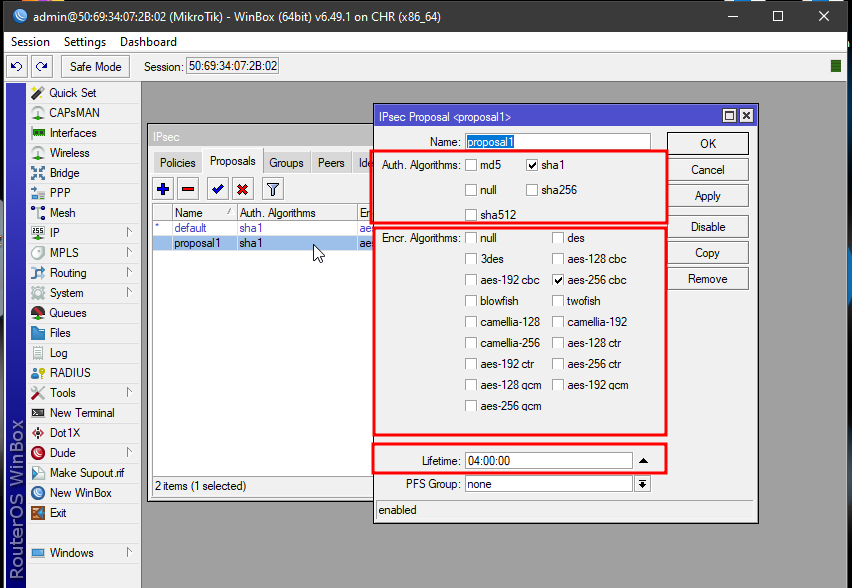
Pada IPSec >> Proposal. Tambahkan konfigurasi sebagai berikut.
| Auth Algorithm | sha1 | Authentication Algorithm |
| Encryption Algorithm | aes-256-cbc | Encryption Algorithm |
| Lifetime | 04:00:00 | Lifetime (Menyesuaikan dengan ASA Configuration) |
| PFS Group | None | Menyesuaikan dengan ASA Configuration |
Konfigurasi Phase 2 :: Menambahkan Policies
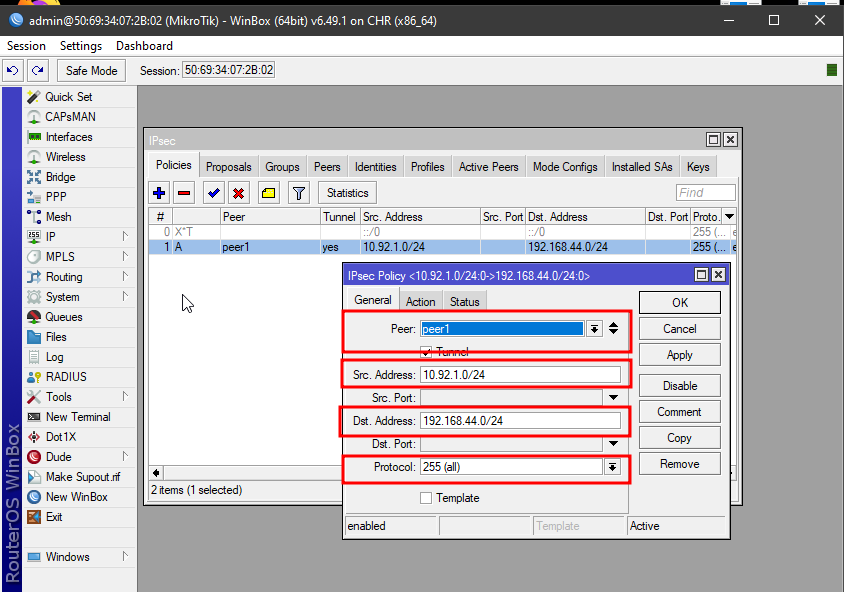
Policies akan digunakan untuk menambahkan koneksi site-to-site pada routerOS mikrotik. Untuk memulai konfigurasi buka IPSec >> Policies >> kemudian tambahkan konfigurasi berikut
| Peer | peer1 | Konfigurasi peer yang telah dibuat sebelumnya |
| Scr Address | 10.92.1.0/24 | Source Address dari internal network (mikrotik LAN) |
| Dst Address | 192.168.44.0/24 | Destination Address dari remote network (ASA LAN) |
| Protocol | 255 | Allow all protocol (ICMP, TCP, UDP dll) |
| Action >> IPSec Protocol | esp | Phase2 IPSec Transform Set |
| Action >> Proposal | proposal1 | Berdasarkan proposal yang telah dibuat sebelumnya |

Konfirmasi IPSec S2S Phase Status
Berikut adalah beberapa command yang dapat digunakan untuk mengonfirmasi status dari tiap Phase IPSec
Konfirmasi Phase 1
Pada ASA
Apabila Status statemenunjukan MM_ACTIVEmaka proses IKE phase 1 berhasil dilakukan
LOCAL-ASA# show crypto ikev1 sa
IKEv1 SAs:
Active SA: 1
Rekey SA: 0 (A tunnel will report 1 Active and 1 Rekey SA during rekey)
Total IKE SA: 1
1   IKE Peer: 1.0.0.6
Type    : L2L             Role    : responder
Rekey   : no              State   : MM_ACTIVE
LOCAL-ASA#
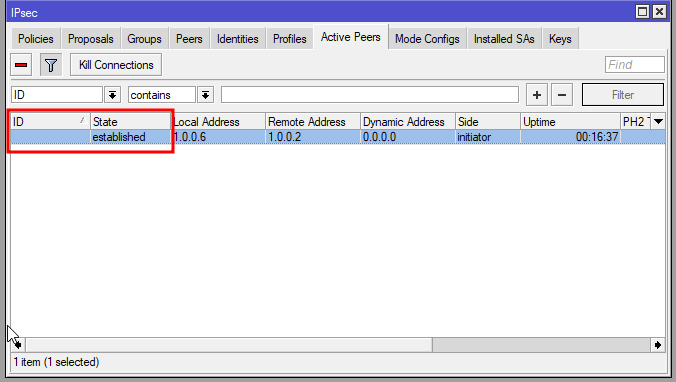
Pada Mikrotik
IPSec >> Active Peers. Kemudian Cek pada bagian state
Konfirmasi Phase 2
Pada ASA
OCAL-ASA# show ipsec sa peer 1.0.0.6
peer address: 1.0.0.6
Crypto map tag: outside_map, seq num: 10, local addr: 1.0.0.2
access-list asa-vpn-mikrotik extended permit ip 192.168.44.0 255.255.255.0 10.92.1.0 255.255.255.0
local ident (addr/mask/prot/port): (192.168.44.0/255.255.255.0/0/0)
remote ident (addr/mask/prot/port): (10.92.1.0/255.255.255.0/0/0)
current_peer: 1.0.0.6
#pkts encaps: 0, #pkts encrypt: 0, #pkts digest: 0
#pkts decaps: 0,#pkts decrypt: 0, #pkts verify: 0
#pkts compressed: 0, #pkts decompressed: 0
#pkts not compressed: 0, #pkts comp failed: 0, #pkts decomp failed: 0
#pre-frag successes: 0, #pre-frag failures: 0, #fragments created: 0
#PMTUs sent: 0, #PMTUs rcvd: 0, #decapsulated frgs needing reassembly: 0
#TFC rcvd: 0, #TFC sent: 0
#Valid ICMP Errors rcvd: 0, #Invalid ICMP Errors rcvd: 0
#send errors: 0, #recv errors: 0
local crypto endpt.: 1.0.0.2/0, remote crypto endpt.: 1.0.0.6/0
path mtu 1500, ipsec overhead 74(44), media mtu 1500
PMTU time remaining (sec): 0, DF policy: copy-df
ICMP error validation: disabled, TFC packets: disabled
current outbound spi: 06651A70
current inbound spi : 2C1B6599
inbound esp sas:
spi: 0x2C1B6599 (739992985)
SA State: active
transform: esp-aes-256 esp-sha-hmac no compression
in use settings ={L2L, Tunnel, IKEv1, }
slot: 0, conn_id: 24764416, crypto-map: outside_map
sa timing: remaining key lifetime (kB/sec): (4374000/13323)
IV size: 16 bytes
replay detection support: Y
Anti replay bitmap:
0x00000000 0x00000001
outbound esp sas:
spi: 0x06651A70 (107289200)
SA State: active
transform: esp-aes-256 esp-sha-hmac no compression
in use settings ={L2L, Tunnel, IKEv1, }
slot: 0, conn_id: 24764416, crypto-map: outside_map
sa timing: remaining key lifetime (kB/sec): (4374000/13323)
IV size: 16 bytes
replay detection support: Y
Anti replay bitmap:
0x00000000 0x00000001
LOCAL-ASA#
Pada Mikrotik
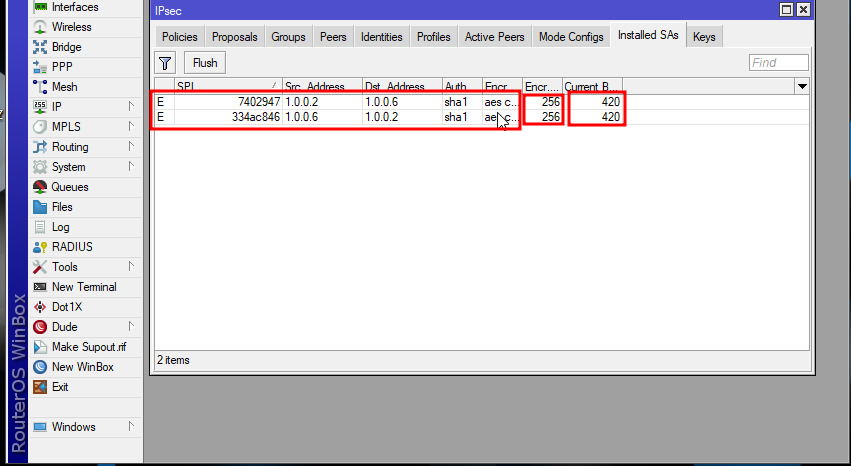
IPSec >> Installed SA.
Kita dapat melihat pada destination address 1.0.0.2 dimana terlihat Current bytes 420 yang menandakan adanya paket ke ke destination tersebut menggunakan tunnel VPN Site-to-site
- https://www.watchguard.com/help/docs/help-center/en-us/Content/en-US/Fireware/bovpn/manual/diffie_hellman_c.html ↩︎
- https://docs.sse.cisco.com/sse-user-guide/docs/supported-ipsec-parameters ↩︎
- https://datakomputer.com/apa-itu-nat-traversal/ ↩︎