
Artikel ini akan menjelaskan cara menkonfigurasi VPN Site-to-Site pada ASA dan ASA.
Prerequisites
Dengan membaca artikel ini, anda diasumsikan telah mengetahui konsep-konsep seperti :
- Konsep dasar Routing & Switching
- Konsep Firewall
- IPSec VPN Site To Site
- Access-LIst (ACL)
Device Info
| Cisco ASA | Cisco ASA | |
| Jenis Perangkat | Firewall | Firewall |
| Version | 9.8(1) | 9.8(1) |
Topology
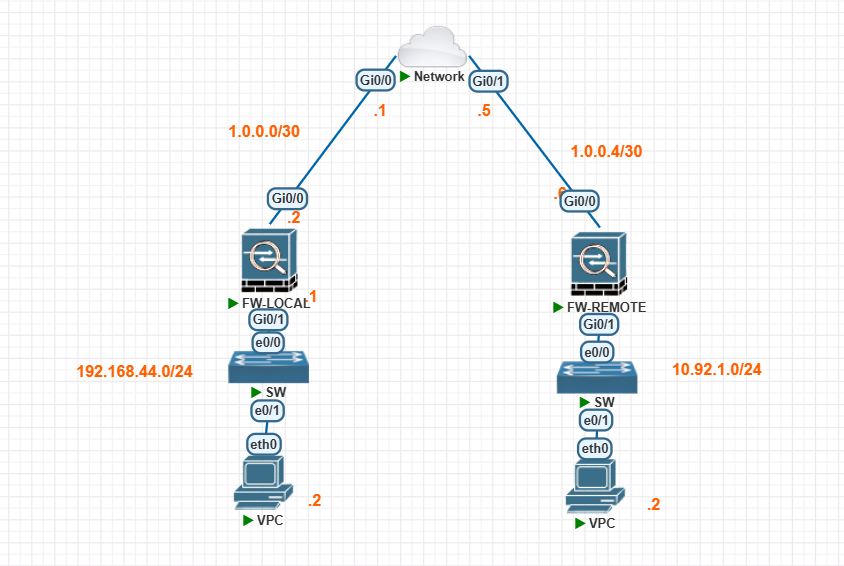
Pada topoliogi ini kita sebagai PC-1 (192.168.45.1) ingin mengakses PC-2 (10.92.2.1) pada yang terletak pada remote site. Karena data yang akan dikirim oleh PC 1 dan PC 2 berisi informasi sensitif maka akan dilakukan enkripsi ketika melalui internet. Enkripsi tersebut akan dilakukan dengan bantuan VPN Site-to-site pada kedua sisi.
Konfigurasi pada PC menggunakan static IP. Tidak ada configurasi lanjutan pada Switch dan PC karena diluar scope topik saat ini. ISP pada topologi diatas menggunakan loopback router sebagai bentuk simulasi interne. VPN Site to Site pada konfigurasi ini menggunakan tipe rule based VPN
| IPSec Parameter | ASA (Local Site) | ASA (Remote) |
| IKE type | IKEv1 | IKEv1 |
| Pre-Shared-Key | Cisc0@N3tw0rK! | Cisc0@N3tw0rK! |
| P1 Encryption | AES-256 | AES-256 |
| P1 Authentication (Integrity) | SHA | SHA |
| P1 Diffie-Helman Group | Group 2 | Group 2 |
| P1 Lifetime | 4 Hours | 4 Hours |
| P2 Encryption Transform | ESP-AES-256 | ESP-AES-256 |
| P2 Authentication | ESP-SHA-HMAC | ESP-SHA-HMAC |
| P2 Lifetime | 4 Hours | 4 Hours |
Cisco ASA Configuration
Pre-Config
conf t
hostname LOCAL-ASA
! Konfigurasi Interface
interface g0/0
nameif outside
no shut
ip address 1.0.0.2 255.255.255.252
interface g0/1
nameif inside
no shut
ip address 192.168.44.1 255.255.255.0
! Konfigurasi Routing Outside
route outside 0 0 1.0.0.1
! Konfigurasi ACL untuk Traffic Outside
access-list GeneralTraffic extended permit ip any4 any4
access-group GeneralTraffic in interface outsideIPsec Site-to-Site Config
! Object-Group untuk Segmen "interesting traffic"
object-group network local-network
network-object 192.168.44.0 255.255.255.0
object-group network remote-network
network-object 10.92.1.0 255.255.255.0
access-list asa-s2s-asa extended permit ip object-group local-network object-group remote-network
! PHASE 1 :::::
! Membuat Policy untuk IKEv1 Phase 1
! encryption, hash untuk authentication param, DH-Group 2, lifetime 4 Jam
crypto ikev1 policy 10
encryption aes-256
hash sha
authentication pre-share
group 2
lifetime 14400
! Enable IKEv1 pada interface outside
crypto ikev1 enable outside
! PHASE :: 2
! Tunnel Group for IKEv1
tunnel-group 1.0.0.6 type ipsec-l2l
tunnel-group 1.0.0.6 ipsec-attributes
pre-shared-key Cisc0@N3tw0rK!
! IPSec Transform Set (Phase 2)
crypto ipsec transform-set ESP-AES256-SHA esp-aes-256 esp-sha-hmac
! Crypto Map Untuk Phase 2
crypto map outside_map 10 match address asa-s2s-asa
crypto map outside_map 10 set peer 1.0.0.6
crypto map outside_map 10 set transform-set ESP-AES256-SHA
crypto map outside_map 10 set security-association lifetime seconds 14400
crypto map outside_map interface outsideRemote Cisco ASA Configuration
Pre-Config
conf t
hostname LOCAL-ASA
! Konfigurasi Interface
interface g0/0
no shut
nameif outside
ip address 1.0.0.6 255.255.255.252
interface g0/1
no shut
nameif inside
ip address 10.92.1.1 255.255.255.0
! Konfigurasi Routing Outside
route outside 0 0 1.0.0.1
! Konfigurasi ACL untuk Traffic Outside
access-list GeneralTraffic extended permit ip any4 any4
access-group GeneralTraffic in interface outsideIPsec Site-to-Site Config
! Object-Group untuk Segmen "interesting traffic"
object-group network remote-network
network-object 192.168.44.0 255.255.255.0
object-group network local-network
network-object 10.92.1.0 255.255.255.0
access-list asa-s2s-asa extended permit ip object-group local-network object-group remote-network
! PHASE 1 :::::
! Membuat Policy untuk IKEv1 Phase 1
! encryption, hash untuk authentication param, DH-Group 2, lifetime 4 Jam
crypto ikev1 policy 10
encryption aes-256
hash sha
authentication pre-share
group 2
lifetime 14400
! Enable IKEv1 pada interface outside
crypto ikev1 enable outside
! PHASE :: 2
! Tunnel Group for IKEv1
tunnel-group 1.0.0.6 type ipsec-l2l
tunnel-group 1.0.0.6 ipsec-attributes
pre-shared-key Cisc0@N3tw0rK!
! IPSec Transform Set (Phase 2)
crypto ipsec transform-set ESP-AES256-SHA esp-aes-256 esp-sha-hmac
! Crypto Map Untuk Phase 2
crypto map outside_map 10 match address asa-s2s-asa
crypto map outside_map 10 set peer 1.0.0.6
crypto map outside_map 10 set transform-set ESP-AES256-SHA
crypto map outside_map 10 set security-association lifetime seconds 14400
crypto map outside_map interface outsideKonfirmasi IPSec S2S Phase Status
Berikut adalah beberapa command yang dapat digunakan untuk mengonfirmasi status dari tiap Phase IPSec
Konfirmasi Phase 1
Apabila Status statemenunjukan MM_ACTIVEmaka proses IKE phase 1 berhasil dilakukan
LOCAL-ASA# show crypto ikev1 sa IKEv1 SAs: Active SA: 1 Rekey SA: 0 (A tunnel will report 1 Active and 1 Rekey SA during rekey) Total IKE SA: 1 1 IKE Peer: 1.0.0.6 Type : L2L Role : responder Rekey : no State : MM_ACTIVE LOCAL-ASA#Konfirmasi Phase 2
Apabila status inbound dan outbound menunjukan status active maka proses ekripsi dan dekripsi data berhasil dilakukan. Selain itu, kita juga dapat melihat berapa banyak bit paket yang telah berhasil di enkapsulasi dan di-dekapsulasi pada proses enkripsi vpn ini.
LOCAL-ASA# show ipsec sa peer 1.0.0.6
peer address: 1.0.0.6
Crypto map tag: outside_map, seq num: 10, local addr: 1.0.0.2
access-list asa-s2s-asa extended permit ip 192.168.44.0 255.255.255.0 10.92.1.0 255.255.255.0
local ident (addr/mask/prot/port): (192.168.44.0/255.255.255.0/0/0)
remote ident (addr/mask/prot/port): (10.92.1.0/255.255.255.0/0/0)
current_peer: 1.0.0.6
 #pkts encaps: 0, #pkts encrypt: 0, #pkts digest: 0
#pkts decaps: 23, #pkts decrypt: 23, #pkts verify: 23
#pkts compressed: 0, #pkts decompressed: 0
#pkts not compressed: 0, #pkts comp failed: 0, #pkts decomp failed: 0
#pre-frag successes: 0, #pre-frag failures: 0, #fragments created: 0
#PMTUs sent: 0, #PMTUs rcvd: 0, #decapsulated frgs needing reassembly: 0
#TFC rcvd: 0, #TFC sent: 0
#Valid ICMP Errors rcvd: 0, #Invalid ICMP Errors rcvd: 0
#send errors: 0, #recv errors: 0
local crypto endpt.: 1.0.0.2/0, remote crypto endpt.: 1.0.0.6/0
path mtu 1500, ipsec overhead 74(44), media mtu 1500
PMTU time remaining (sec): 0, DF policy: copy-df
ICMP error validation: disabled, TFC packets: disabled
current outbound spi: BB906D28
current inbound spi : 05C4DBAC
inbound esp sas:
spi: 0x05C4DBAC (96787372)
SA State: active
transform: esp-aes-256 esp-sha-hmac no compression
in use settings ={L2L, Tunnel, IKEv1, }
slot: 0, conn_id: 247595008, crypto-map: outside_map
sa timing: remaining key lifetime (kB/sec): (3914998/13600)
IV size: 16 bytes
replay detection support: Y
Anti replay bitmap:
0x00000000 0x00FFFFFF
outbound esp sas:
spi: 0xBB906D28 (3146804520)
SA State: active
transform: esp-aes-256 esp-sha-hmac no compression
in use settings ={L2L, Tunnel, IKEv1, }
slot: 0, conn_id: 247595008, crypto-map: outside_map
sa timing: remaining key lifetime (kB/sec): (3915000/13600)
IV size: 16 bytes
replay detection support: Y
Anti replay bitmap:
0x00000000 0x00000001
LOCAL-ASA#
Untuk Melihat Uptime
Untuk melihat informasi uptime, kita dapat menggunakan vpn-sessiondb. Pada bagian duration untuk bagian encryption dapat terlihat sudah berala lama proses autentikasi peer-to-peer berlangsung.
Bagian idle time outmenunjukan berapa lama maksimal waktu time-out phase 2 berlangsung. Apabila tidak terjadi traffic selama waktu tersebut (Idle-to-left habis) maka phase2 akan dimatikan dan akan aktif kembali ketika traffic S2S kembali berjalan
LOCAL-ASA# show vpn-sessiondb detail l2l filter ipaddress 1.0.0.6
Session Type: LAN-to-LAN Detailed
Connection   : 1.0.0.6
Index        : 60448                  IP Addr      : 1.0.0.6
Protocol     : IKEv1 IPsec
Encryption   : IKEv1: (1)AES256  IPsec: (1)AES256
Hashing      : IKEv1: (1)SHA1  IPsec: (1)SHA1
Bytes Tx     : 0                      Bytes Rx     : 1972
Login Time   : 21:52:16 UTC Fri Aug 29 2025
Duration     : 0h:28m:50s
IKEv1 Tunnels: 1
IPsec Tunnels: 1
IKEv1:
Tunnel ID    : 60448.1
UDP Src Port : 500                    UDP Dst Port : 500
IKE Neg Mode : Main                   Auth Mode    : preSharedKeys
Encryption   : AES256                 Hashing      : SHA1
Rekey Int (T): 14400 Seconds          Rekey Left(T): 12670 Seconds
D/H Group    : 2
Filter Name  :
IPsec:
Tunnel ID    : 60448.2
Local Addr   : 192.168.44.0/255.255.255.0/0/0
Remote Addr  : 10.92.1.0/255.255.255.0/0/0
Encryption   : AES256                 Hashing      : SHA1
Encapsulation: Tunnel
Rekey Int (T): 14400 Seconds          Rekey Left(T): 12670 Seconds
Rekey Int (D): 4608000 K-Bytes        Rekey Left(D): 4607999 K-Bytes
Idle Time Out: 30 Minutes             Idle TO Left : 7 Minutes
Bytes Tx     : 0                      Bytes Rx     : 1972
Pkts Tx      : 0                      Pkts Rx      : 23
LOCAL-ASA#